
Features Built for General Contractors
Everything you need to track, verify, and manage subcontractor compliance — without the paperwork chaos.
Zero Friction for Your Subs
Your Subs Never Need an Account.
The #1 reason compliance tools fail is subcontractor resistance. We eliminated it. Your subs never create an account, never remember a password, never log in to anything.
Most compliance platforms fail because subs refuse to create accounts, remember passwords, or learn a new portal. SUBCREWZ removes that entirely: the GC owns the profile, sends a one-click secure link, and the sub uploads straight from their phone — no login, no app, no training.
-
1You choose which documents you need and send a secure one-click link from your dashboard
-
2The sub taps the link on their phone and uploads directly — no account, no password, no app download
-
3Files land in their profile instantly. CrewScan AI reads and extracts the data automatically — you just review and confirm
Secure Upload Link
Expires after use • No login required
GC selects before sending
Sub sees this on their phone
Requested by your contractor:
Sub receives a secure one-click link — no account needed
Powered by CrewScan AI
Upload a PDF.
We Handle the Rest.
Stop manually typing policy numbers and expiration dates off paper certificates. Upload any PDF and SUBCREWZ reads it for you — instantly extracting every critical field so you can review and save in seconds.
- Detects document type automatically — COI, W-9, contractor license, OSHA cert, lien waiver, and 40+ document types
- Extracts all policy data in one pass — General Liability, Workers' Comp, Auto, and Umbrella from a single COI upload
- You stay in control — extracted data pre-fills the form, you review it, then confirm. No blind automation.
- Works on every plan — included in Starter, Professional, and Business at no extra cost
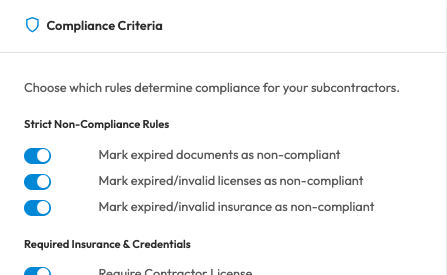
Define Your Own Custom Compliance Rules
Every General Contractor has different risk tolerances. SUBCREWZ lets you customize exactly what makes a subcontractor "Compliant" or "At Risk" based on your company's unique requirements.
- Mandatory Documents: Choose whether to require W-9s, specific insurance policies, or surety bonds.
- Strict Non-Compliance Rules: Decide if expired licenses or insurances automatically flag a sub as non-compliant.
- At-Risk Warnings: Set your own "expiring soon" window (e.g., 30, 45, or 60 days) to get alerted early.
Comprehensive Subcontractor Risk Profiles
A complete 360-degree view of every subcontractor's qualifications, history, and compliance status.
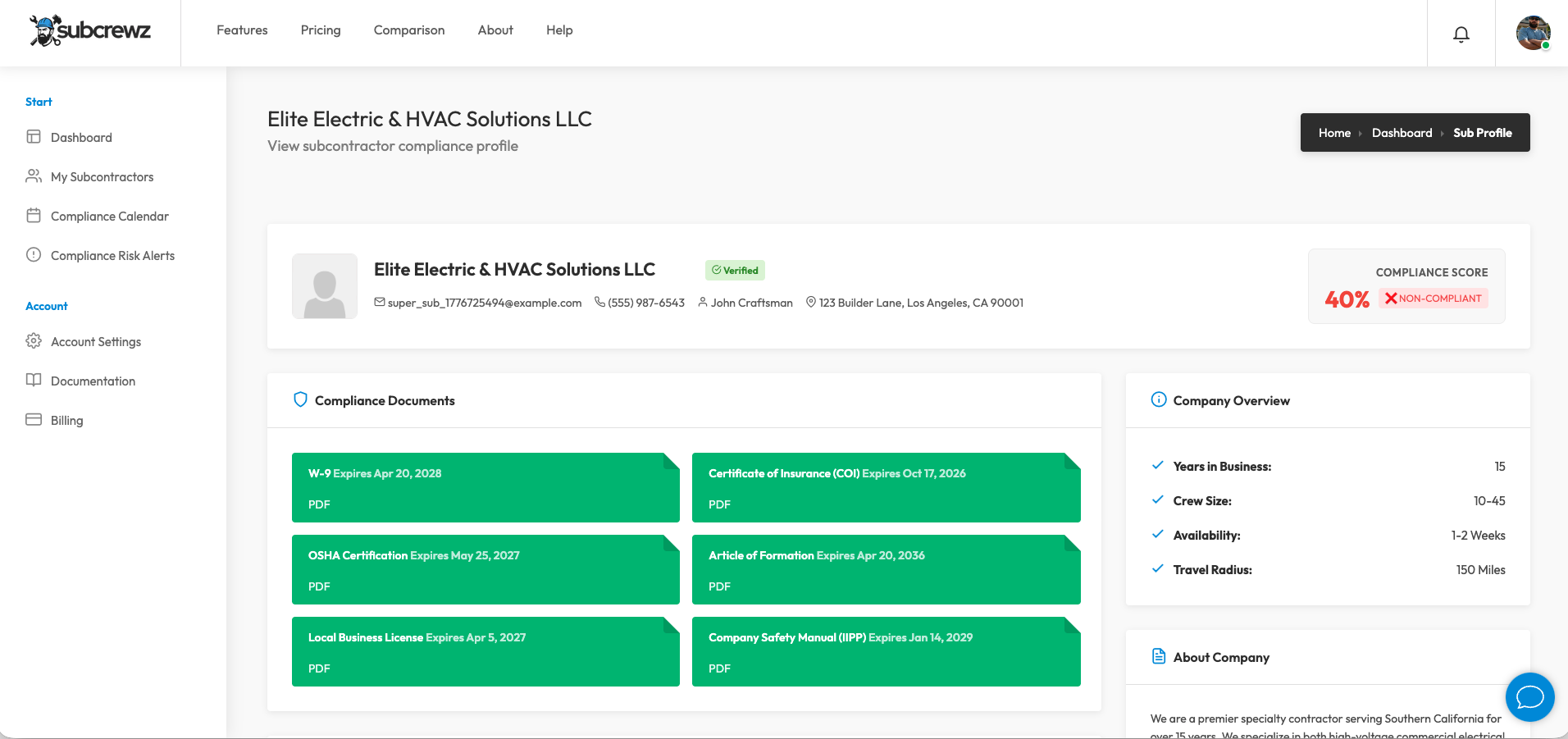
What's Inside Every Profile
100% GC-Controlled: Maintain complete authority over your data. You build the profiles, upload the documents, and verify the details—no waiting on subcontractors to update their own accounts.
Track contact info, union status, MBE/WBE classifications, and critical safety data like EMR & TRIR.
Log state contractor licenses, classifications, OSHA certifications, and EPA credentials.
Securely store General Liability, Workers' Comp, Auto, Umbrella policies, and surety bonds.
Monitor crew sizes, equipment inventory, travel radius, and real-time availability.
Every profile is instantly graded against your company's specific compliance requirements.
Instantly search your roster by company name, filter by compliance status, or narrow by active vs. inactive subs.
Upload photos from past jobs to document work quality and track performance over time.
Keep private internal records on subcontractor performance, budget adherence, and reliability.
The Compliance Score Explained
A simple 0 to 100 health grade for your subcontractors. Know exactly who is safe to put on a job site today.
Compliant (80-100%)
What it means: They are safe to work.
How to get it: The subcontractor has uploaded all required critical documents, and none are expired or expiring soon.
At Risk (50-79%)
What it means: Warning. Allowed to work today, but needs attention.
How to get it: Missing a non-critical document, or a major insurance policy is expiring within 30 days.
Non-Compliant (0-49%)
What it means: Stop work. Do not let them on site.
How to get it: Missing a critical, required document entirely, or a license/insurance has actively expired.
In short: You start at 100%. The system automatically deducts points if paperwork is missing or expiring soon, and drops you into the red zone if something actually expires. You can completely customize which documents are considered 'critical' in your Account Settings.
Powerful Compliance Automation
Everything you need to eliminate paperwork chaos and protect your job sites
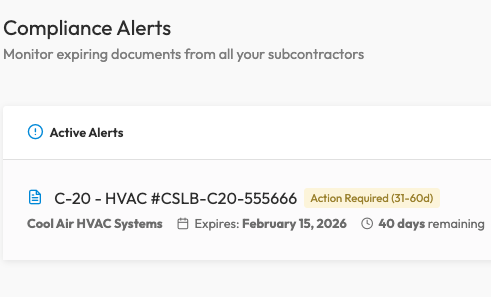
Intelligent Expiration Alerts
Stop manually checking dates. SUBCREWZ constantly monitors your database and proactively warns you when a subcontractor's paperwork is about to expire.
- Visual risk dashboard highlights who is COMPLIANT, AT RISK, or NON-COMPLIANT
- Automated 30, 15, and 7-day expiration countdowns
- Filter subs by compliance status to quickly identify issues
- Customizable compliance criteria tailored to your company's risk tolerance
Audit-Ready in Seconds
One-Click Compliance Report.
Inspector-Ready PDF.
When a licensing board auditor or labor inspector shows up on your jobsite, you need to prove compliance instantly — not scramble through emails and folders. SUBCREWZ generates a professional compliance report for your entire subcontractor roster in seconds.
- Every sub license, insurance, and COI status on one page
- Color-coded: Compliant, At Risk, or Non-Compliant
- Expiration dates flagged automatically
- Download as PDF directly from your browser
- Timestamped — shows inspectors records are current
Every Document Type, Covered
SUBCREWZ tracks 40+ document types — from core insurance to state-specific compliance forms. CrewScan AI reads and extracts data from all of them automatically.
- W-9
- Certificate of Insurance (COI)
- Certificate of Insurance – Acord 25
- Contractor License
- Local Business License
- License Status (Active)
- General Liability Insurance
- Workers' Compensation Insurance
- Auto / Commercial Vehicle Insurance
- Umbrella / Excess Liability Insurance
- Additional Insured Endorsement (CG 20 10)
- Waiver of Subrogation
- Primary & Non-Contributory Endorsement
- Insurance Endorsements
- Bond
- Performance Bond
- Payment Bond
- OSHA 10-Hour Card
- OSHA 30-Hour Card
- OSHA 300 Log (Injury & Illness)
- EPA Lead / Asbestos Certification
- Safety Plan / IIPP
- Heat Illness Prevention Plan
- SDS / MSDS Sheets
- Drug-Free Workplace Policy
- Background Check Authorization
- Article of Formation / Articles of Incorporation
- Operating Agreement
- Entity Type Documentation
- Federal EIN / Tax ID
- Signed Subcontract Agreement
- I-9 Employment Eligibility Verification
- Preliminary / Pre-Lien Notice
- Conditional Lien Waiver (upon payment)
- Unconditional Lien Waiver (upon final payment)
- Retainage Agreement
- Certified Payroll Report (WH-347)
- Change Order Documentation
- Stop Notice Documentation
- DBE / MBE / WBE Certification
- Federal Excluded Parties Verification (SAM.gov)
Need a document type not listed? Contact us — we add new types regularly.
Stop Chasing Paperwork. Start Protecting Your Business.
Your entire sub roster, fully monitored, starting today. Try it free for 7 days.
7-day free trial • Credit card required • Cancel anytime before the trial ends and you won't be charged.
Plans start at $99/mo • See all plans